> ## Documentation Index
> Fetch the complete documentation index at: https://docs.lunary.ai/llms.txt
> Use this file to discover all available pages before exploring further.
# Observability
Lunary has powerful observability features that lets you record and analyze your LLM calls.
There are 3 main observability features: analytics, logs and traces.
Analytics and logs are automatically captured as soon as you integrate our SDK.
Learn how to install the Python SDK.
Learn how to install the JS SDK.
Learn how to integrate with LangChain.
## Analytics
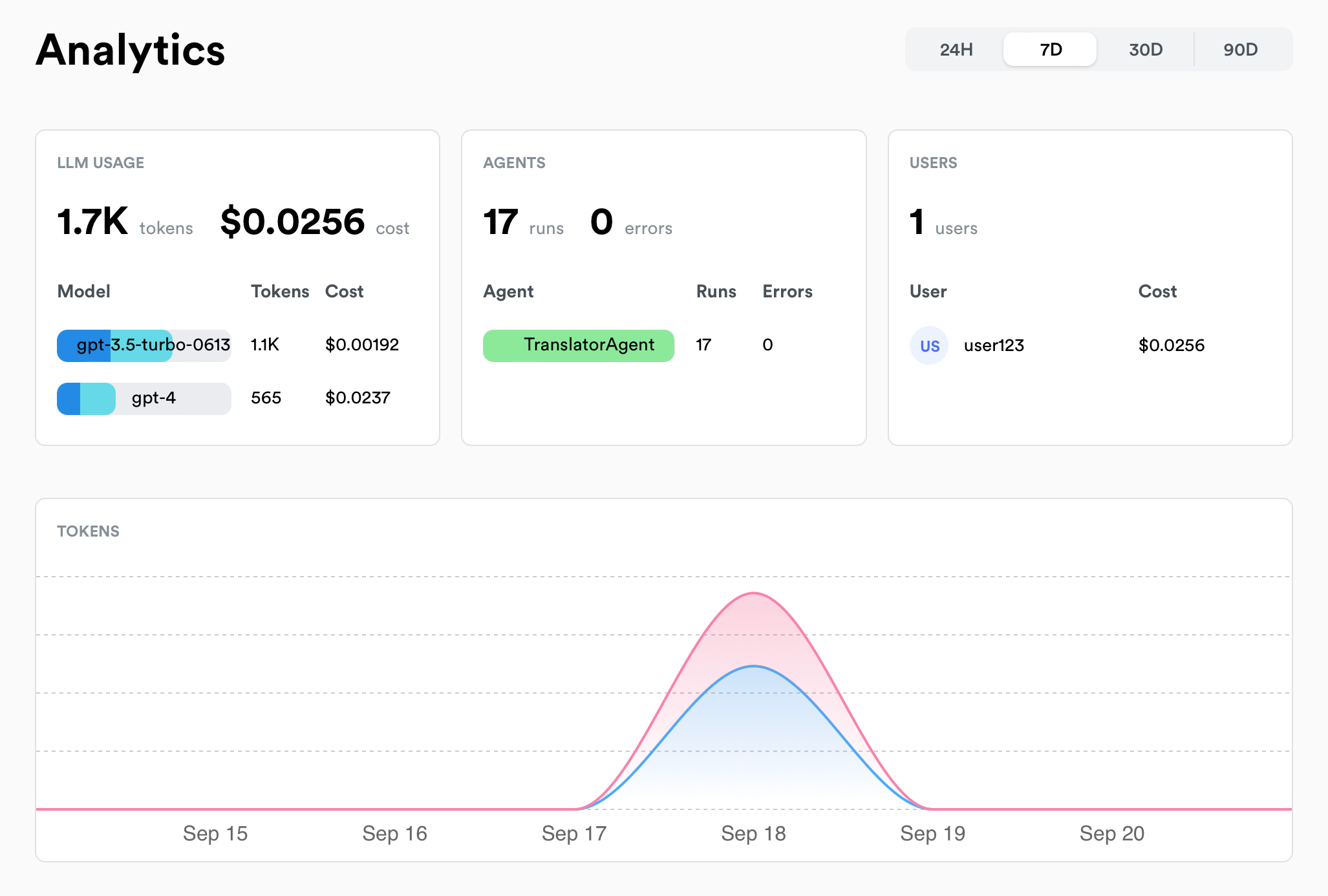 The following metrics are currently automatically captured:
| Metric | Description |
| -------------- | ---------------------------------------------------- |
| 💰 **Costs** | Costs incurred by your LLM models |
| 📊 **Usage** | Number of LLM calls made & tokens used |
| ⏱️ **Latency** | Average latency of LLM calls and agents |
| ❗ **Errors** | Number of errors encountered by LLM calls and agents |
| 👥 **Users** | Usage over time of your top users |
## Logs
Lunary allows you to log and inspect your LLM requests and responses.
The following metrics are currently automatically captured:
| Metric | Description |
| -------------- | ---------------------------------------------------- |
| 💰 **Costs** | Costs incurred by your LLM models |
| 📊 **Usage** | Number of LLM calls made & tokens used |
| ⏱️ **Latency** | Average latency of LLM calls and agents |
| ❗ **Errors** | Number of errors encountered by LLM calls and agents |
| 👥 **Users** | Usage over time of your top users |
## Logs
Lunary allows you to log and inspect your LLM requests and responses.
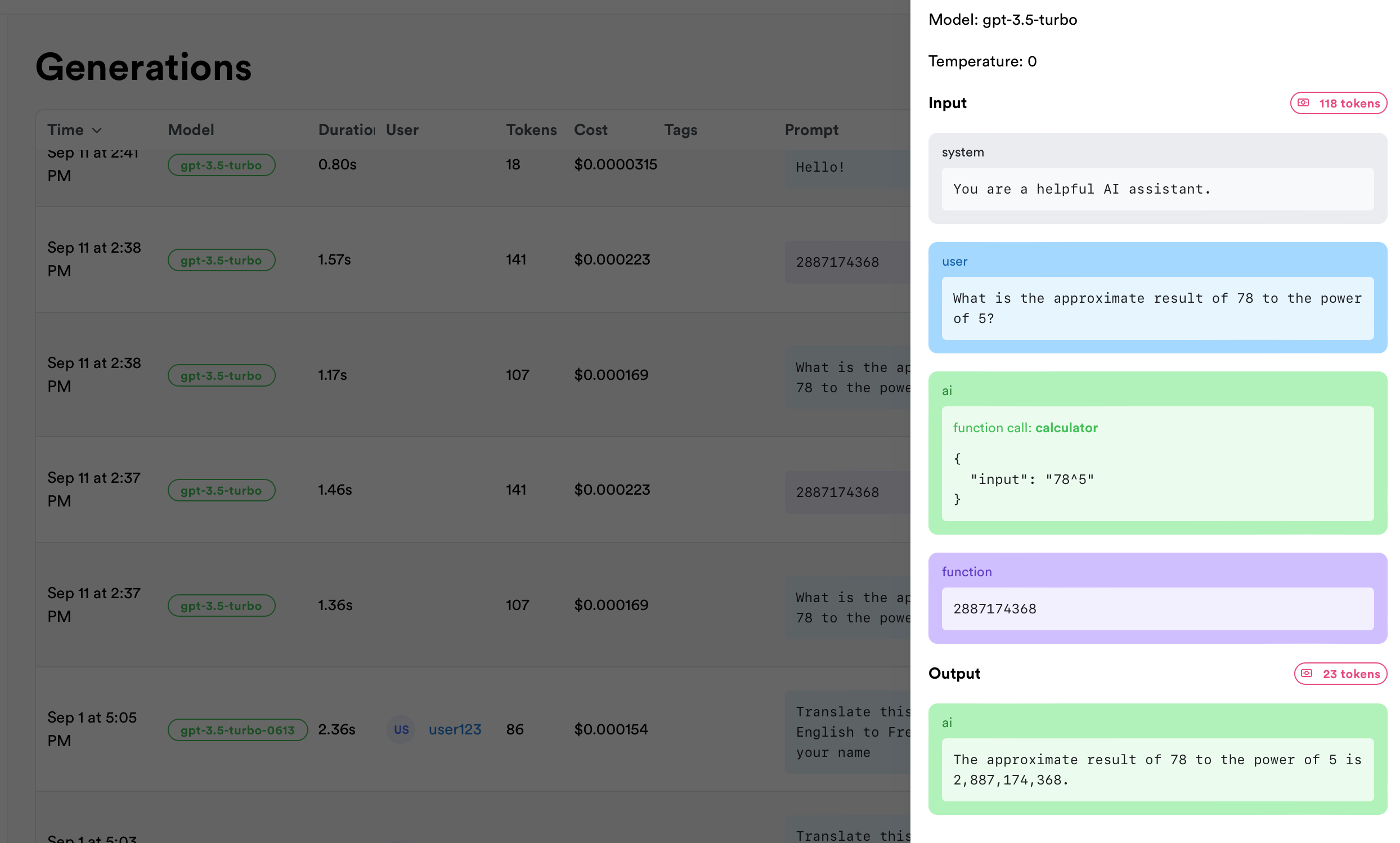 Logging is automatic as soon as you integrate our SDK.
## Tracing
Tracing is helpful to debug more complex AI agents and troubleshoot issues.
Logging is automatic as soon as you integrate our SDK.
## Tracing
Tracing is helpful to debug more complex AI agents and troubleshoot issues.
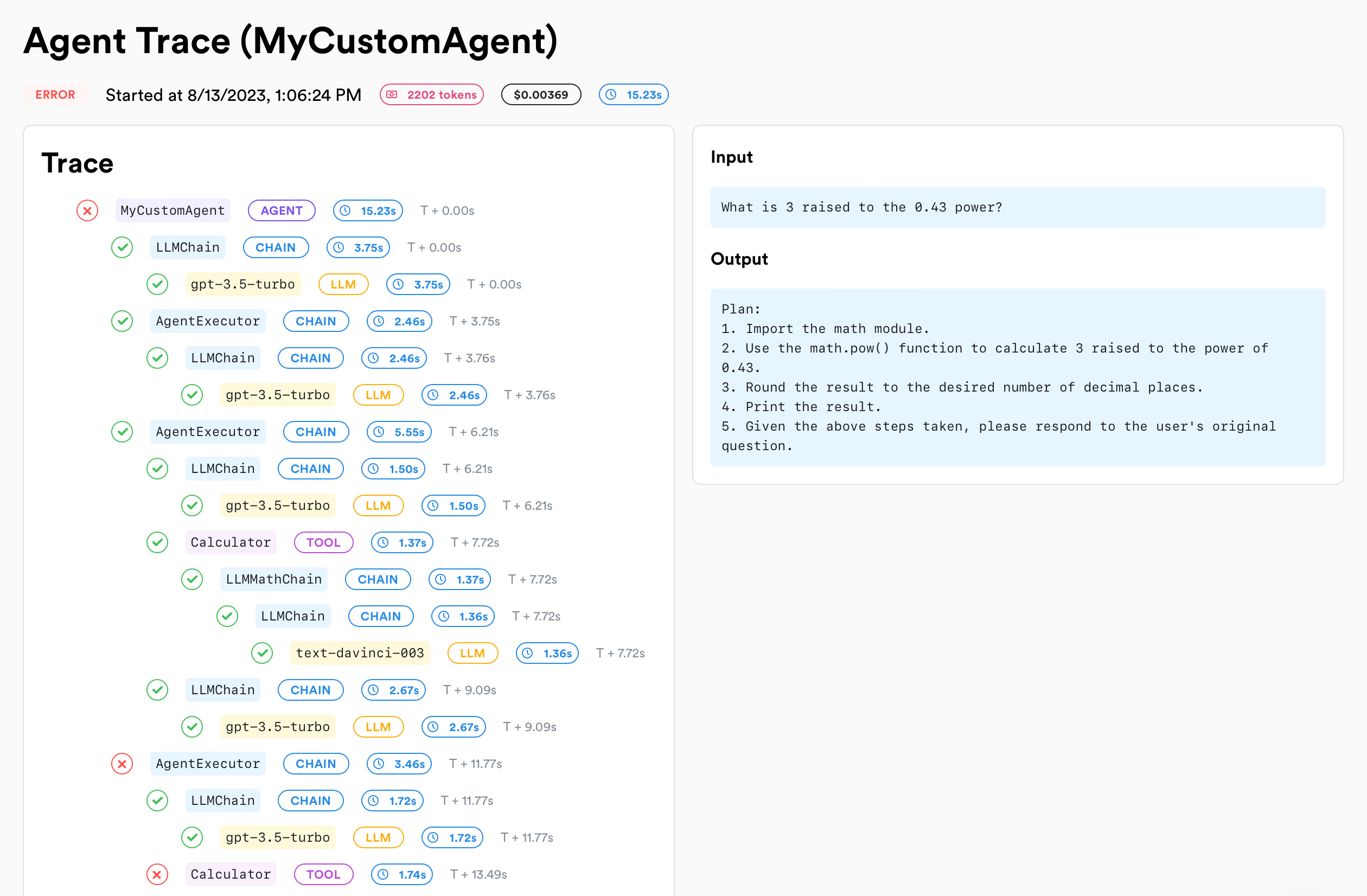 The easiest way to get started with traces is to use our utility wrappers to automatically track your agents and tools.
### Wrapping Agents
By wrapping an agent, input, outputs and errors are automatically tracked.
Any query ran inside the agent will be tied to the agent.
}>
Agents & tools are automatically named from the wrapped function's name. You can change the name by passing a 2nd argument `{ name: "custom-name" }` to the `wrapAgent` and `wrapTool` methods.
```js theme={null}
// By wrapping your agent's function input, outputs and errors are automatically tracked.
// Sub tools and logs will be tied to the correct agent.
const myAgent = lunary.wrapAgent(async function MyAgent(input) {
// Your agent custom logic
// ...
})
await myAgent("Hello, how are you?")
```
If you prefer to use anonymous functions, make sure to pass a name as a 2nd argument to the `wrapAgent` and `wrapTool` methods.
```js theme={null}
const myAgent = lunary.wrapAgent(
(input) => {
// Your agent custom logic
// ...
},
{ name: "MyAgent" }
)
```
```py theme={null}
import lunary
@lunary.agent()
def MyAgent(input): # Your agent custom logic # ...
pass
```
### Wrapping Chains
Chains are sequences of operations that combine multiple LLM calls, tools, or processing steps into a single workflow. By wrapping chains, you can track the entire sequence of operations as a single unit while still maintaining visibility into each individual step.
```js theme={null}
const chain = lunary.wrapChain(async function Chain(input) {
// Your chain custom logic
// Call LLM
// Invoke tool
// etc...
})
await chain('Hello, how are you?')
```
```py theme={null}
@lunary.chain()
def Chain(input): # Your chain custom logic # ...
pass
```
### Wrapping Tools
If your agents use tools, you can wrap them as well to track them.
If a wrapped tool is executed inside a wrapped agent, the tool will be automatically tied to the agent without the need to manually reconcialiate them.
```js theme={null}
// By wrapping the tool, input, outputs and errors are automatically tracked.
// And sub tools / logs will be tied to the correct agent.
const calculator = lunary.wrapTool(async function Calculator(input) {
// Your custom logic
// ...
})
await calculator('1 + 2')
```
```py theme={null}
import lunary
@lunary.tool(name='MySuperTool')
def MyTool(input): # Your tool custom logic # ...
pass
```
The easiest way to get started with traces is to use our utility wrappers to automatically track your agents and tools.
### Wrapping Agents
By wrapping an agent, input, outputs and errors are automatically tracked.
Any query ran inside the agent will be tied to the agent.
}>
Agents & tools are automatically named from the wrapped function's name. You can change the name by passing a 2nd argument `{ name: "custom-name" }` to the `wrapAgent` and `wrapTool` methods.
```js theme={null}
// By wrapping your agent's function input, outputs and errors are automatically tracked.
// Sub tools and logs will be tied to the correct agent.
const myAgent = lunary.wrapAgent(async function MyAgent(input) {
// Your agent custom logic
// ...
})
await myAgent("Hello, how are you?")
```
If you prefer to use anonymous functions, make sure to pass a name as a 2nd argument to the `wrapAgent` and `wrapTool` methods.
```js theme={null}
const myAgent = lunary.wrapAgent(
(input) => {
// Your agent custom logic
// ...
},
{ name: "MyAgent" }
)
```
```py theme={null}
import lunary
@lunary.agent()
def MyAgent(input): # Your agent custom logic # ...
pass
```
### Wrapping Chains
Chains are sequences of operations that combine multiple LLM calls, tools, or processing steps into a single workflow. By wrapping chains, you can track the entire sequence of operations as a single unit while still maintaining visibility into each individual step.
```js theme={null}
const chain = lunary.wrapChain(async function Chain(input) {
// Your chain custom logic
// Call LLM
// Invoke tool
// etc...
})
await chain('Hello, how are you?')
```
```py theme={null}
@lunary.chain()
def Chain(input): # Your chain custom logic # ...
pass
```
### Wrapping Tools
If your agents use tools, you can wrap them as well to track them.
If a wrapped tool is executed inside a wrapped agent, the tool will be automatically tied to the agent without the need to manually reconcialiate them.
```js theme={null}
// By wrapping the tool, input, outputs and errors are automatically tracked.
// And sub tools / logs will be tied to the correct agent.
const calculator = lunary.wrapTool(async function Calculator(input) {
// Your custom logic
// ...
})
await calculator('1 + 2')
```
```py theme={null}
import lunary
@lunary.tool(name='MySuperTool')
def MyTool(input): # Your tool custom logic # ...
pass
```