> ## Documentation Index
> Fetch the complete documentation index at: https://docs.lunary.ai/llms.txt
> Use this file to discover all available pages before exploring further.
# User Tracking
Identify your users, track their cost, conversations and more.
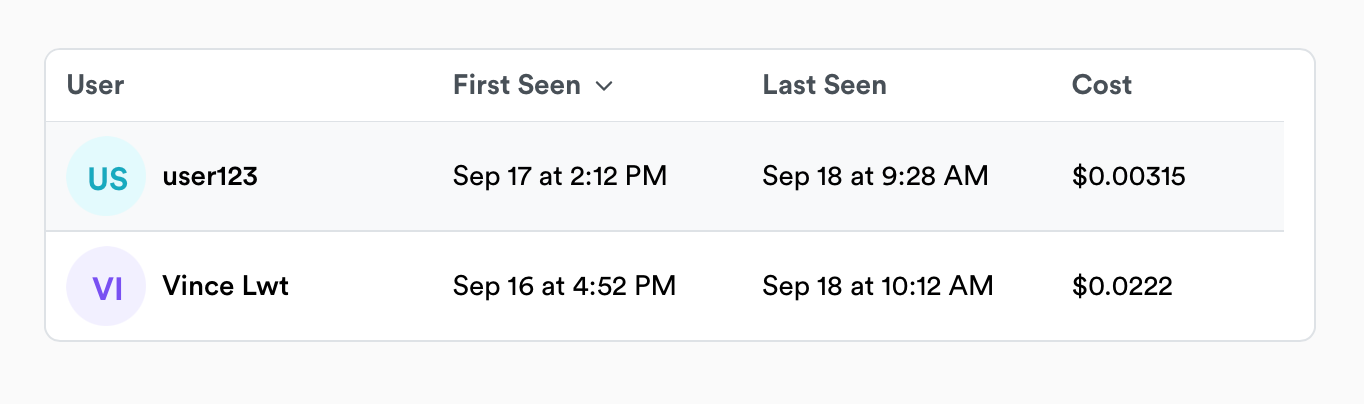 The strict minimum to enable user tracking is to report a `userId`, however you can report any property you'd like such as an email or name using an `userProps` object.
## Tracking users with the backend SDK
Learn how to install the Python SDK.
Learn how to install the JS SDK.
### Identify OpenAI calls
The easiest way to get started tracking users is to send user data with your OpenAI API call.
```js theme={null}
const res = await openai.chat.completions.create({
model: "gpt-4o",
messages: [{ role: "user", content: "Hello" }],
user: "user123",
userProps: { name: "John" },
})
```
```py theme={null}
chat_completion = client.chat.completions.create(
model="gpt-4o",
messages=[{"role": "user", "content": "Hello"}],
user_id="user123",
user_props={ "name": "John" }
)
```
If you're using LangChain, you can similarly pass user data as metadata.
```js theme={null}
const chat = new ChatOpenAI({
callbacks: [new LunaryHandler()],
});
const res = await chat.call([new HumanMessage("Hello!")], {
metadata: {
userId: "123",
userProps: { name: "John" },
},
});
```
```py theme={null}
handler = LunaryCallbackHandler()
chat = ChatOpenAI(
callbacks=[handler],
metadata={
"user_id": "user123"
}, # Assigning user ids to models in the metadata
)
```
### Advanced: Inject user into context
When tracking traces, you can inject user data into the context using the `identify` methods. This will cascade down to all the child runs.
```js theme={null}
async function TranslatorAgent(input) {
// Some AI queries
// Everything done in this context will be tracked with the user
}
// Wrap the agent with the monitor
const translate = lunary.wrapAgent(TranslatorAgent)
// Using identify to inject the user into the context
const res = await translate(`Hello, what's your name?`)
.identify("user123", { email: "email@example.org" })
```
```py theme={null}
import lunary
def my_agent():
# Some AI queries
# Everything done in this context will be tracked with the user
def main():
# Using identify to inject the user into the context
with lunary.identify('user123', user_props={"email": "email@example.org"}):
my_agent()
```
## Identifying users on the frontend
If you are [tracking chat messages](/features/chats) or [feedback](/features/feedback) on the frontend, you can use the `identify` method to identify the user there.
```js theme={null}
lunary.identify("user123", {
email: "test@example.org",
});
```
## Identifying Threads
If you are using [threads](/features/threads) to track conversations, you can pass `userId` and `userProps` to the `openThread` method.
```js theme={null}
const thread = await lunary.openThread({
userId: "user123",
userProps: { name: "John" },
});
```
## User Properties
While you can track any property you'd like, we recommend using the following ones:
| Property | Description |
| -------- | --------------------------------------- |
| `name` | Name of the user |
| `email` | Email of the user |
| `avatar` | URL to an avatar |
| `group` | Group or company ID the user belongs to |
The strict minimum to enable user tracking is to report a `userId`, however you can report any property you'd like such as an email or name using an `userProps` object.
## Tracking users with the backend SDK
Learn how to install the Python SDK.
Learn how to install the JS SDK.
### Identify OpenAI calls
The easiest way to get started tracking users is to send user data with your OpenAI API call.
```js theme={null}
const res = await openai.chat.completions.create({
model: "gpt-4o",
messages: [{ role: "user", content: "Hello" }],
user: "user123",
userProps: { name: "John" },
})
```
```py theme={null}
chat_completion = client.chat.completions.create(
model="gpt-4o",
messages=[{"role": "user", "content": "Hello"}],
user_id="user123",
user_props={ "name": "John" }
)
```
If you're using LangChain, you can similarly pass user data as metadata.
```js theme={null}
const chat = new ChatOpenAI({
callbacks: [new LunaryHandler()],
});
const res = await chat.call([new HumanMessage("Hello!")], {
metadata: {
userId: "123",
userProps: { name: "John" },
},
});
```
```py theme={null}
handler = LunaryCallbackHandler()
chat = ChatOpenAI(
callbacks=[handler],
metadata={
"user_id": "user123"
}, # Assigning user ids to models in the metadata
)
```
### Advanced: Inject user into context
When tracking traces, you can inject user data into the context using the `identify` methods. This will cascade down to all the child runs.
```js theme={null}
async function TranslatorAgent(input) {
// Some AI queries
// Everything done in this context will be tracked with the user
}
// Wrap the agent with the monitor
const translate = lunary.wrapAgent(TranslatorAgent)
// Using identify to inject the user into the context
const res = await translate(`Hello, what's your name?`)
.identify("user123", { email: "email@example.org" })
```
```py theme={null}
import lunary
def my_agent():
# Some AI queries
# Everything done in this context will be tracked with the user
def main():
# Using identify to inject the user into the context
with lunary.identify('user123', user_props={"email": "email@example.org"}):
my_agent()
```
## Identifying users on the frontend
If you are [tracking chat messages](/features/chats) or [feedback](/features/feedback) on the frontend, you can use the `identify` method to identify the user there.
```js theme={null}
lunary.identify("user123", {
email: "test@example.org",
});
```
## Identifying Threads
If you are using [threads](/features/threads) to track conversations, you can pass `userId` and `userProps` to the `openThread` method.
```js theme={null}
const thread = await lunary.openThread({
userId: "user123",
userProps: { name: "John" },
});
```
## User Properties
While you can track any property you'd like, we recommend using the following ones:
| Property | Description |
| -------- | --------------------------------------- |
| `name` | Name of the user |
| `email` | Email of the user |
| `avatar` | URL to an avatar |
| `group` | Group or company ID the user belongs to |